A job application tracker that fills itself in.
Candora adds each application to its tracker the moment you submit it on a supported site, so the list never goes stale. It reminds you to follow up after a week, marks jobs that go quiet as “No answer” after three weeks, compares offers and exports everything as CSV, all free and in your browser.
Add Candora to Chrome, it’s free
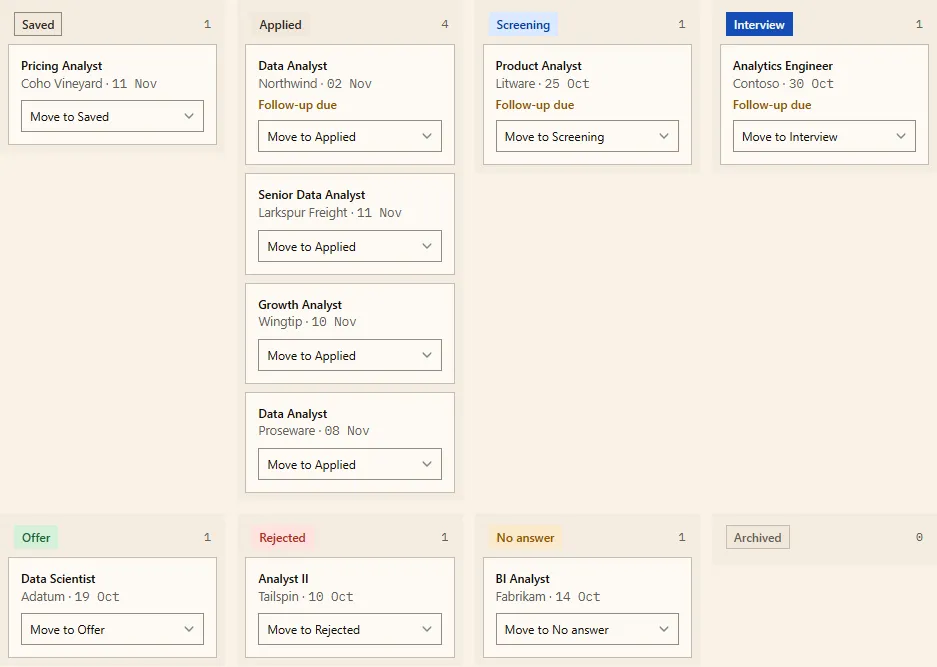
Saved when you submit
When you submit an application on one of the career sites Candora fills (Workday, Greenhouse, Lever and others) or on a job board like LinkedIn Easy Apply or Indeed, Candora sees the confirmation and adds the job with its title, company and link. To keep a job you haven’t applied to yet, or one from any other site, right-click the page and choose Add this job to Candora tracker; it starts as Saved.
Statuses and reminders
- Each job moves through Saved, Applied, Screening, Interview, Offer, Rejected, No answer and Archived, as a table or a board.
- After 7 days Candora reminds you to follow up, with a hint that fits the stage: a check-in after applying, next steps after a screen, a thank-you after an interview.
- After 21 days without a change, it marks the job No answer, so the list shows what is still live. Change both numbers in Settings.
- Jobs you saved but haven’t applied to get a nudge after 3 days: apply or let them go.
- A weekly summary shows how many you sent compared with the week before.
Compare offers
When a job reaches Offer, open the calculator under the tracker and add base salary, bonus, equity per year, sign-on, benefits and paid days off, with a decide-by date. Candora shows the first year and each year after side by side, in each offer’s currency, and marks the highest when they share one.
Import and export
Moving from a spreadsheet? Import a CSV and match its columns. Export the whole tracker as CSV at any time; it’s your data.
Reply inbox, with Pro
Pro gives you a private Candora email address. Forward employers’ replies to it (a Gmail filter does this for you) and each email is sorted as received, assessment, interview, offer or rejection, and matched to the job in your tracker, where one click moves it on. Only the kind, the sender’s domain, the subject and the company are kept, for 90 days.
How to start
- Install Candora. The tracker works without an account or a profile.
- Apply as usual on a supported site, or right-click any job page to save it.
- Open Candora’s Tracker page, or the side panel for today’s applications and who to follow up with.
Honest limits
- Automatic saving needs a site Candora recognises. On other sites, add the job with a right-click.
- Without Pro, status changes after you apply are yours to make: Candora doesn’t read your email unless you forward replies to the reply inbox.
- Without an account the tracker lives in one browser. Export a CSV now and then, or use Pro sync.
Questions
- Is there a free job application tracker that fills itself in?
- Candora is a free Chrome extension that adds a job to its tracker when you submit an application on a supported career site or job board, with the title, company, link and date. You can also add any job by right-clicking the page.
- When does Candora mark an application as No answer?
- After 21 days without a status change, and it reminds you to follow up after 7 days. You can change both numbers in Settings.
- Can I import my spreadsheet tracker?
- Yes. Import a CSV from the tracker’s Import/Export menu and match its columns, and export everything as CSV whenever you like.
- Can it compare job offers?
- Yes. When a job reaches Offer, add base salary, bonus, equity per year, sign-on, benefits and paid days off, and Candora shows the first-year and yearly totals side by side, marking the highest when the currencies match.
- Does the tracker update itself when employers reply?
- With Pro ($9 a month), forward employers’ emails to your private Candora address and each one is sorted as received, assessment, interview, offer or rejection and matched to the job, so one click moves it on.
- Where is my tracker stored?
- In your browser, with no account needed. With Pro it syncs across browsers.